


A Guide to Security Camera Video Surveillance
- Бонус за регистрацию онлайн казино
- Aug 5, 2025
- 17 min read
When we talk about security camera video surveillance today, we're not just talking about hitting "record." We're talking about building an intelligent, proactive shield for your property. It's helpful to think of a modern system less like a simple camera and more like a tireless digital security team—one that sees everything, remembers it perfectly, and knows the difference between a real threat and a cat chasing a squirrel.
Understanding Modern Security Camera Video Surveillance
At its core, a security camera video surveillance system is a network of interconnected parts, all working together to protect what's yours. It's not just a camera screwed to a wall; it’s a fully integrated team where every component plays a critical role. This is a far cry from the grainy, passive recording devices you might remember from years ago.
Every system, big or small, is built on these fundamental components:
Cameras (The Eyes): These are your frontline observers, capturing the visual story from your most important areas. Today’s cameras range from stunningly clear 4K models that pick up tiny details to 360-degree fisheye cameras that leave no blind spots.
Recorders (The Brain & Memory): This is where the magic happens. A Network Video Recorder (NVR) for IP systems or a Digital Video Recorder (DVR) for older analog setups processes the video, stores the footage, and runs the software that makes the whole system smart.
Software (The Intelligence): This is how you interact with your system—viewing live video, searching through recordings, and tweaking settings. More and more, this software is supercharged with artificial intelligence (AI), which adds a powerful layer of automated analysis.
The Shift from Passive to Proactive Security
The most significant evolution in security over the last decade has been the jump from passively recording events to actively analyzing and responding to them in real time. Old systems were entirely reactive; you'd only check the footage after something bad had already happened.
Modern security camera video surveillance is all about prevention and immediate awareness.
A modern system doesn't just show you a recording of a break-in. It's designed to alert you the moment someone is loitering near your back door. It can tell the difference between a delivery driver dropping off a package and someone trying to peek into your windows, giving you the chance to act before a situation gets worse.
This leap in capability is driving incredible growth. The global security camera market is projected to grow by USD 3.85 billion between 2025 and 2029, a surge directly fueled by advancements in AI-powered video analytics and smart integrations. You can review the market projections to see just how much AI is changing the game.
Ultimately, this intelligent approach creates a complete ecosystem of protection. The cameras provide the sight, the recorder provides the memory, and the software delivers the crucial, actionable insights. Together, they offer a powerful solution for anyone looking for true peace of mind and control over their property’s security.
Analog vs. IP Cameras: Which System is Right for You?
When you're setting up a video surveillance system, one of the first big decisions you'll face is choosing between analog and IP technology. It’s a bit like deciding between an old-school flip phone and a modern smartphone. Both can make calls, but their features, quality, and what you can do with them are worlds apart.
The Old Guard: Analog (CCTV) Systems
Analog systems, what most people know as CCTV (Closed-Circuit Television), are the tried-and-true workhorses of the security world. They’ve been around for decades. These systems use coaxial cables—the same kind that used to bring cable TV into your home—to send video from the camera directly to a Digital Video Recorder (DVR). It's a straightforward, reliable setup.
The main drawback? Simplicity comes with limitations. Analog cameras just can't compete on picture quality. They offer lower resolutions, which means details can get fuzzy, making it tough to identify a face or read a license plate. Expanding the system can also be a headache, as every new camera needs its own cable run all the way back to the DVR.
The New Standard: IP (Network) Camera Systems
On the other side, you have IP (Internet Protocol) cameras. These are the modern standard, and for good reason. Instead of a direct-to-DVR connection, IP cameras are smart devices that connect to your computer network, just like your laptop or printer. They send crisp, digital video over standard Ethernet cables to a Network Video Recorder (NVR).
This network-based approach completely changes the game. IP cameras deliver stunning high-definition video, with many offering 4K resolution. That level of clarity can be the difference between seeing a blurry figure and getting a positive ID. Because they live on your network, they're also incredibly flexible. Need to add another camera? Just plug it into a nearby network port.
Beyond picture quality, IP systems are the gateway to all the smart features you hear about, like AI-powered video analytics, checking your cameras from a phone app, and connecting with other security gadgets. Their only real dependency is a healthy network; if your network is solid, your camera system will be, too.
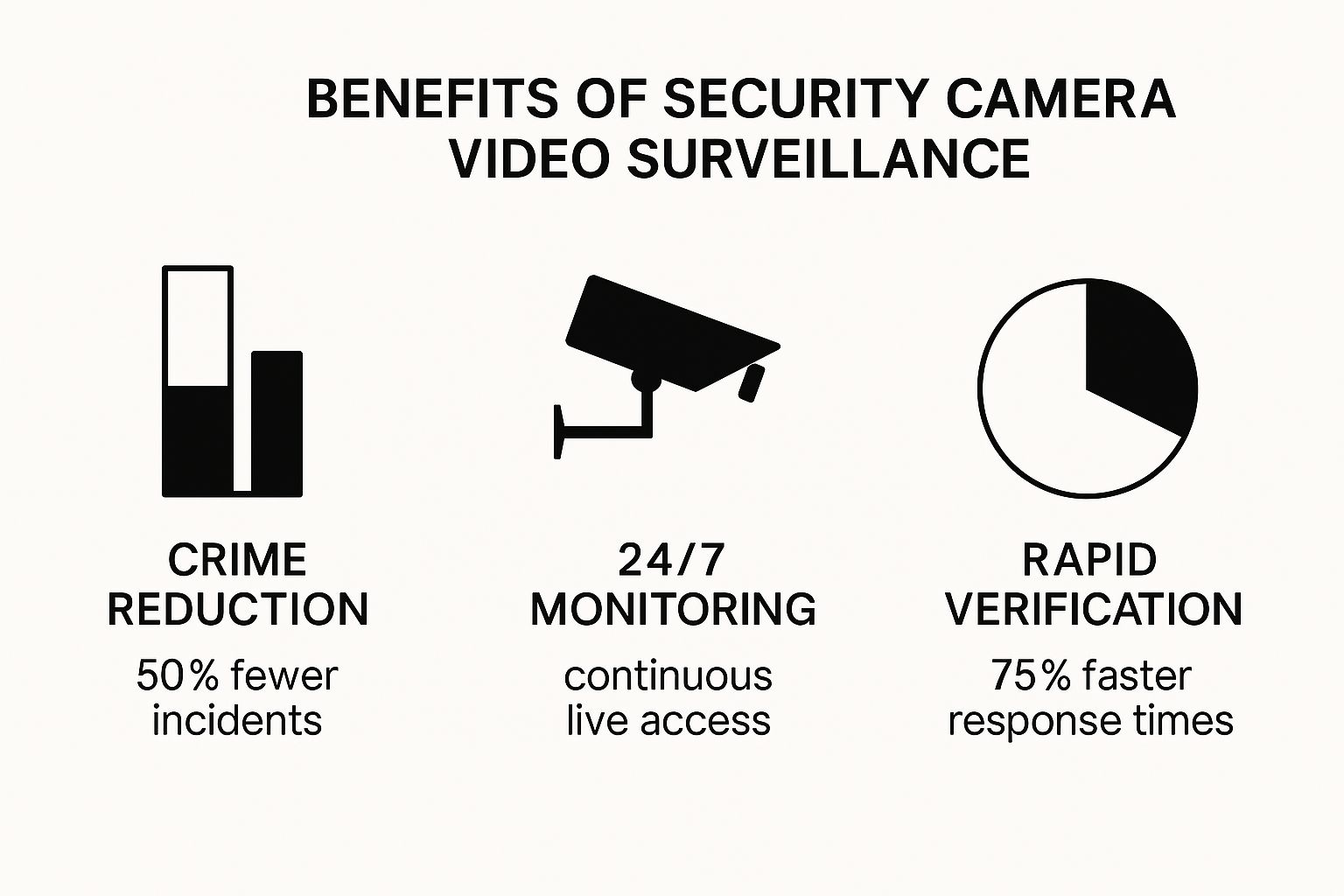
The data here really drives the point home: a modern security system isn't just about recording what happens. It's a powerful tool that actively deters crime, helps you verify events quickly, and gives you a much faster way to respond to emergencies.
To make the choice clearer, let's break down the key differences in a simple table.
Analog (CCTV) vs. IP Camera Systems at a Glance
Feature | Analog (CCTV) Systems | IP (Network) Systems |
|---|---|---|
Video Quality | Standard Definition (lower resolution) | High Definition (HD, 4K, and higher) |
Cabling | Coaxial cable for video, plus a separate power cable | Single Ethernet cable for both data and power (PoE) |
Scalability | Difficult; requires new cable runs to the DVR | Easy; add cameras anywhere on the network |
Features | Basic recording and playback | Advanced analytics, remote access, smart integrations |
Cost | Lower initial hardware cost, but can be higher overall | Higher initial hardware cost, but often lower installation cost |
Ultimately, while analog might look cheaper upfront, the superior performance and flexibility of IP systems often provide better long-term value.
What About Cost and Installation?
Years ago, analog was the clear winner for anyone on a tight budget. But things have changed. The price for IP cameras and recorders has dropped dramatically, making them far more accessible for small businesses and homeowners.
Installation is another huge factor. An analog system needs two separate wires run to each camera: one for video (coaxial) and one for power. That's double the cable, double the work, and often, double the cost for labor. Most IP cameras, on the other hand, use a brilliant technology called Power over Ethernet (PoE).
What is Power over Ethernet (PoE)?PoE is a game-changer. It lets a single Ethernet cable carry both the video signal and the electricity needed to power the camera. This means you only need to run one wire to each camera, slashing installation time, reducing clutter, and saving a lot of money on labor.
That single-cable setup makes installing an IP system much cleaner, faster, and, in many cases, more affordable than a seemingly "cheaper" analog system.
So, How Do You Choose?
The right choice really boils down to your specific situation. If you have a tiny space, need only one or two cameras, and your absolute top priority is the lowest possible upfront cost, an older analog system might still get the job done.
However, for almost everyone else, an IP system is the way to go. Whether you're a small business owner who needs indisputable evidence or a homeowner who wants the peace of mind of checking in from anywhere, the investment is well worth it. The crystal-clear image quality, intelligent features, and ability to easily expand your security camera video surveillance system make IP the smarter, more powerful choice for today and for the future.
Key Features of a High-Performing Surveillance System
The days when a security camera’s only job was to record grainy, barely-usable footage are long gone. Modern surveillance systems are packed with sophisticated features that turn them from passive observers into active, intelligent security partners. To build a system that delivers real value, you have to understand what these key features actually do for you.
First up is video resolution. This is all about detail. Think of it as the difference between a blurry, pixelated photo and a sharp, professional one. More pixels mean a clearer image, which is absolutely critical when you need to identify a face, read a license plate, or make out exactly what’s happening in the distance.
From Blurry Blobs to Crystal-Clear Evidence
You'll most often see resolutions like 1080p (Full HD) and 4K (Ultra HD). While 1080p is a solid starting point for general monitoring, 4K offers four times the number of pixels. That upgrade can be the difference between seeing a vague human shape and being able to describe the logo on their jacket.
For businesses and any high-security area, 4K is quickly becoming the standard for a good reason. The sheer level of detail it captures turns your video footage from a simple recording into undeniable evidence.
Next, you need to think about what happens when the lights go out. A huge number of security incidents happen under the cover of darkness, which is why effective night vision isn't just a nice-to-have; it's non-negotiable.
You'll generally run into two main types:
Infrared (IR) Night Vision: This is the most common. It uses infrared LEDs to light up an area with a light that's invisible to the human eye. The camera sees it perfectly, delivering a crisp black-and-white video.
Color Night Vision: More advanced cameras use incredibly sensitive sensors, sometimes with a little supplemental lighting, to capture video in full color, even in very low light. This can provide game-changing details, like the color of a getaway car or a suspect's clothing.
Balancing Light and Shadow with WDR
Ever tried to take a picture of someone standing in front of a bright window? The background gets blown out, and the person becomes a dark silhouette. Security cameras face the exact same challenge, but they have a powerful solution: Wide Dynamic Range (WDR).
WDR technology essentially mimics the human eye. It captures multiple images at different exposure levels and then merges them to create a single, perfectly balanced picture. This means you can see details clearly in both the bright, sunlit spots and the deep shadows of the same scene. For entryways, parking lots, or any area with tricky lighting, WDR is a mission-critical feature.
A camera with strong WDR ensures that a person walking out of a dark garage into bright sunlight doesn’t just become a washed-out figure. You get a clear view of their face and actions, which is vital for effective surveillance.
Perhaps the biggest leap forward in modern surveillance, though, is the integration of Artificial Intelligence (AI). Think of AI as giving your camera a brain. Instead of just seeing a collection of pixels, the camera can now start to understand what it's looking at.
The Power of Intelligent AI Analytics
AI-powered analytics are what filter out the noise and let you focus on what actually matters. A camera with AI-driven person detection won't bother you every time the wind rustles the leaves on a tree. It learns to ignore that kind of irrelevant motion and only sends an alert when it spots an actual person, vehicle, or even an animal.
Some of the most common AI features include:
Person and Vehicle Detection: Tells the difference between people, cars, and other moving objects to dramatically reduce false alarms.
License Plate Recognition (LPR): Automatically captures and logs license plates—perfect for parking management and controlling access.
Line Crossing Detection: Triggers an alert when someone or something crosses a virtual line you've drawn in the camera’s view.
Loitering Detection: Identifies when a person lingers in a specific area for too long, alerting you to suspicious behavior before it escalates.
This kind of intelligence makes your entire security system smarter, more efficient, and far more reliable. This constant innovation is what's fueling the massive growth in the market. The global surveillance camera industry, valued at USD 43.65 billion in 2024, is on track to hit USD 81.37 billion by 2030. This boom is driven by a rising demand for proactive security and new tech like solar-powered and cellular cameras that push surveillance into off-grid locations. You can dive deeper into these trends in surveillance technology with a detailed market analysis.
By prioritizing high resolution, capable night vision, WDR, and smart AI analytics, you're not just buying a camera—you're building a system that delivers actionable intelligence.
How to Manage Your Video Storage and Access
Capturing crystal-clear video is just the starting point. A security camera video surveillance system is only as good as your ability to reliably store and access that footage, especially when an incident occurs. Deciding on your storage strategy is a huge deal, forcing you to balance cost, convenience, and, most importantly, security.
Think of it like deciding where to keep your most valuable possessions. You could lock them in a safe at home, giving you total control, or you could entrust them to a high-security bank vault for professional-grade protection. Each path comes with its own set of pros and cons.
On-Premise Storage: Your Private Video Archive
The old-school method is on-premise, or local, storage using a Network Video Recorder (NVR) or a Digital Video Recorder (DVR). This is essentially creating your own private video archive right on-site. You buy a recorder with a hard drive, and every second of footage is saved directly to that box.
The biggest plus here is direct ownership and control. You have the physical hardware in your building, and there are no monthly fees for storing your video. But that control comes with its own set of risks.
Physical Threats: What happens if a thief steals the recorder? Or a fire or flood destroys your office? All your video evidence vanishes along with the hardware.
Remote Access Hurdles: Getting to your footage from off-site can be a headache, often requiring tricky network setups and port forwarding.
Limited Capacity: Hard drives fill up. Once they’re full, the system either stops recording or starts erasing the oldest footage to make room for the new—a major problem if you need to pull video from a few weeks back.
With local storage, you're the master of your own domain, but that also means you're solely responsible for keeping that data safe.
Cloud Storage: The Digital Fort Knox
Cloud storage flips the script entirely. Instead of saving video to a device in your back office, your footage gets encrypted and beamed over the internet to highly secure data centers run by your provider. It’s the digital equivalent of storing your valuables in Fort Knox.
For a monthly or annual fee, your video is protected off-site, making it safe from local disasters like theft or fire. Even if your cameras are smashed or stolen, the recordings are secure. Cloud storage also makes remote access a breeze, letting you pull up live and recorded video on your phone or computer from anywhere with an internet connection.
The downsides? You'll have an ongoing subscription cost, and it all hinges on your internet connection. You need a solid, high-speed upload connection to push that video to the cloud without it becoming choppy or dropping out.
Finding the Sweet Spot with a Hybrid Approach
For a lot of businesses, the smartest move isn't an either/or choice—it's using both. A hybrid storage approach truly delivers the best of both worlds.
Here’s how it works: your cameras record 24/7 to a local NVR, giving you a complete, on-site record of everything. At the same time, the system is smart enough to automatically push critical event clips—like when motion is detected or someone enters a restricted area—to the cloud for safekeeping. This creates an incredibly resilient system.
You get the instant access and control of local storage for everyday review.
You get the bomb-proof redundancy of cloud backup for the clips that matter most.
It's budget-friendly, since you're only paying for cloud space for specific events, not for constant footage from every single camera.
This layered strategy ensures that no matter what happens at your location, your most critical evidence is safe, sound, and easily accessible. It’s a practical and powerful way to manage your security camera video surveillance data, perfectly balancing peace of mind with your bottom line.
How to Design and Install Your Surveillance System
Putting together a security camera video surveillance system is a lot like drawing up a blueprint before building a house. A well-thought-out plan ensures you cover every angle and that all the parts work together seamlessly. This avoids costly mistakes and, more importantly, prevents dangerous security gaps. The process doesn't start with buying cameras; it starts with a thorough site assessment.
Take a walk around your property, but do it with a critical eye. Ask yourself: where are we most vulnerable? You'll almost always find that key areas include every entry and exit door, all ground-floor windows, and the main paths leading to the building. And don't forget the less obvious spots—hidden corners, back alleys, or areas shielded by landscaping where someone could hide.
This initial walkthrough is about creating a priority list. It helps you separate the absolute "must-have" camera locations from the "nice-to-haves." This is the foundation of your entire security strategy.
Mapping Out Camera Placement and Coverage
Once you have your high-risk zones identified, it’s time to start mapping out where each camera will go. You need to think like a security professional here. The goal is simple: achieve maximum coverage with the fewest possible blind spots. This is where a few key concepts really matter.
Field of View (FoV) is just a technical term for how much a camera can see. A camera with a wide FoV, like a 180-degree model, is fantastic for monitoring big, open areas like a parking lot. On the other hand, a narrow FoV is what you want for zeroing in on a specific point of interest, like a cash register or an entryway.
Camera height and angle are also critical. If you mount them too low, they’re easy targets for tampering. Mount them too high, and you'll get a great view of the tops of people's heads but no identifying facial details. A good rule of thumb is to place them high enough to be out of easy reach, but angled down just enough to clearly capture faces.
One of the most common rookie mistakes is completely ignoring the sun. If you point a camera directly into the sunrise or sunset, the intense glare will wash out your footage, making it useless for large chunks of the day. Always factor in the sun's path when you’re planning your camera angles.
This kind of detailed planning is what turns a random collection of cameras into a cohesive and effective security shield.
Navigating Legal and Ethical Lines
Installing security cameras comes with some serious legal and ethical responsibilities. You can't just put them up wherever you feel like it. The core principle to remember is the "reasonable expectation of privacy." It's illegal to place cameras in areas where people rightfully expect to be private, such as bathrooms, changing rooms, or looking into a neighbor's home.
Recording audio is even trickier and more heavily regulated than video. Many places have two-party consent laws, which means you have to inform everyone within earshot that they are being recorded. To sidestep legal headaches, many businesses simply disable the audio recording features on their cameras. Before you install anything, do your homework and make sure you're following all local, state, and federal laws.
The explosive growth of video surveillance shows just how vital it has become. The global CCTV camera market, which was valued at USD 51.04 billion in 2024, is expected to skyrocket to USD 234.11 billion by 2034. This boom is largely driven by smart city initiatives and major infrastructure projects that rely on surveillance for crime prevention and management. You can dive into a detailed analysis of these global market trends and drivers.
The Technical Side of Installation
With a solid plan in hand, you can move on to the physical installation. For wired systems, this means running cables from each camera back to your NVR. If you're using a Power over Ethernet (PoE) system, things are a bit simpler—a single Ethernet cable handles both power and data for each camera.
To watch your security feed from anywhere, you'll often need to set up port forwarding on your internet router. This is what allows you to create a secure tunnel into your system from your phone or computer. While many modern systems have cloud-based access that makes this easier, having a basic grasp of your network is always a huge advantage for troubleshooting and keeping things secure. A well-planned installation, executed properly, is the key to having a reliable system from day one.
Of course. Here is the rewritten section, designed to sound like an experienced human expert sharing practical advice.
Common Questions About Security Camera Surveillance
Alright, let's get into the questions that always come up once you start thinking seriously about a security camera system. After you've wrapped your head around the basic components, the practical, real-world questions start to surface. This is where the rubber meets the road.
We’ll break down the common concerns we hear every day, from calculating storage needs to keeping your system secure, so you can move forward with confidence.
How Much Video Storage Do I Actually Need?
This is the big one, and probably the most common question we get. The short answer is: it depends. There isn't a magic number, but figuring it out is pretty straightforward once you know what to look at.
Think of it like this: your video recorder's hard drive is a bucket, and each camera is a faucet pouring water into it. How quickly the bucket fills depends on a few things:
Number of Cameras: Obvious, but important. More cameras mean more video streams filling up your drive.
Video Resolution: A crisp 4K camera is a much wider faucet than a 1080p one. It produces a lot more data.
Frame Rate (fps): This is how smooth the video is. Higher frame rates mean more images per second, which means bigger files.
Recording Schedule: Are you recording everything 24/7, or just the interesting parts?
For a rough idea, a single 1080p camera set to record continuously at 15 fps will eat up somewhere between 1-2 TB of storage in a single month. So, for a typical four-camera setup, a 2TB recorder might only give you one to two weeks of continuous footage.
But here’s the single best trick for making your storage last: switch to motion-activated recording. Instead of recording an empty hallway for hours on end, the system only saves clips when someone actually walks by. That simple change can easily stretch two weeks of storage into a month or even more.
Before you buy a hard drive, do yourself a favor and use an online "surveillance storage calculator." You can plug in your specific numbers and get a solid estimate. My advice? Always round up. Running out of storage right before you need to pull footage of an incident is a headache you don't want.
Can My Security Camera System Be Hacked?
Yes, absolutely. Anything you connect to the internet is a potential target, and security cameras are no exception. But don't let that scare you off. The good news is that securing them isn't complicated—it just requires following some basic cyber hygiene.
Protecting your video feed is non-negotiable. Here are the essential steps to lock down your system:
Change Default Credentials Immediately: This is step number one for a reason. Hackers have programs that do nothing but scan the internet for devices using default logins like "admin/password." Change the password on your recorder and every single camera to something long, unique, and strong.
Keep Firmware Updated: Manufacturers find security holes from time to time and release updates to fix them. Think of it like a software update for your phone. Set your system to update automatically if it has the option, or just set a reminder to check for new firmware every couple of months.
Enable Network Encryption: Make sure your Wi-Fi network is using WPA2 or WPA3 encryption. This scrambles the connection between your cameras and router, making the data useless to anyone snooping on your network.
Isolate Your Cameras: If you want to get serious about security, put your cameras on their own separate network or a Virtual LAN (VLAN). This builds a wall between your security system and the network you use for your computers and phones. That way, if one gets compromised, the other stays safe.
Taking these steps will dramatically lower your risk and help ensure your footage stays private.
Are Wireless Security Cameras a Better Choice?
The "wireless vs. wired" debate always comes down to a classic trade-off: convenience versus reliability. Neither one is flat-out "better"—the right choice is all about your property and what you value most.
Wireless cameras are popular because they are incredibly easy and flexible to install. You don't have to drill holes and snake data cables through walls, which makes them a fantastic option for renters or in buildings where wiring is a nightmare.
Just remember, "wireless" doesn't mean "no wires at all." They still need power, which means either plugging them into an outlet or dealing with rechargeable batteries. Their biggest weakness, however, is their reliance on a solid Wi-Fi signal. Thick walls, metal siding, or even a microwave can cause interference and dropouts.
Wired cameras, on the other hand, are the workhorses. Connected with an Ethernet cable, they offer a rock-solid, stable connection that isn’t bothered by Wi-Fi dead zones. This wired link is also more secure from wireless snooping and delivers consistent power right through the same cable using Power over Ethernet (PoE).
It’s really a balancing act:
Choose wireless for: The ultimate convenience, tricky placements, and a fast, drill-free setup.
Choose wired for: Unbeatable reliability, consistent performance, and top-tier security.
What Are the Legal Rules for Placing Cameras?
Surveillance laws can get tricky and vary a lot by country, state, or even city, but a few core ideas are pretty universal. In general, you have the right to record video on your own private property, inside and out.
The legal line you cannot cross is the "reasonable expectation of privacy." This means you can't point cameras into places where people assume they are not being watched, like bathrooms, changing rooms, or bedrooms. This principle extends to your neighbors, too. Your cameras should be aimed at your property, not directly into their living room window or private backyard.
Be extra careful with audio. Recording conversations is a whole different ballgame and is often much more restricted. Many places have "two-party consent" laws, meaning you have to inform everyone that they're being recorded. Frankly, it's often so complex that most businesses just disable audio on their cameras to stay out of legal trouble.
Before you mount a single camera, spend a little time researching the specific surveillance laws in your area. It’s a small effort that can save you a world of trouble later on.
Ready to design a professional surveillance system that meets your specific security and operational needs? The experts at PCI Audio-Video Security Solutions can help you choose the right cameras, storage, and features for your business. Explore our advanced solutions at https://www.pciavss.com.
Comments