


Choosing Wireless Security Cameras for Business
- Бонус за регистрацию онлайн казино
- Aug 26, 2025
- 18 min read
When you think about wireless security cameras for business, it's easy to picture a simple recording device. But the reality is, modern systems are intelligent, scalable tools that give you deep operational insights and boost safety—all without the headache of a massive wiring project. For any growing company, they're simply a smart investment.
Why Smart Businesses Are Cutting the Cord on Security
Switching from old-school wired security systems isn't just a tech upgrade anymore; it's a strategic move. The biggest win? Flexibility.
Imagine you're a retailer and you've just set up a high-value promotional display. You need eyes on it, but only for the next month. With a wireless setup, you can have a new camera up and running in minutes. No electricians, no drilling through walls. That kind of agility is a huge advantage.
The same goes for a construction company needing to secure a temporary job site or a warehouse that just added a new section. You can expand your surveillance footprint on the fly without having to overhaul your entire infrastructure. In today's fast-moving business world, being able to adapt like that is crucial.
The Power of Intelligent Surveillance
Today’s wireless cameras are much more than passive recorders; they're packed with tech that makes them proactive security partners. A lot of this comes down to Artificial Intelligence (AI). Modern systems are smart enough to tell the difference between a person, a passing car, and an animal.
What does that mean for you? Fewer false alarms. You won't get a notification at 3 AM because a stray cat wandered through your parking lot. Instead, you'll get meaningful alerts that actually matter, like a person detected near a restricted entrance after hours. That precision lets you focus on real security events.
Before we dive deeper, let's quickly compare the two main options. It's helpful to see a side-by-side breakdown to understand why so many businesses are making the switch.
Wired vs Wireless: A Quick Comparison for Your Business
This table breaks down the key differences between traditional wired and modern wireless security camera systems, helping you quickly grasp the practical implications for installation, cost, and flexibility.
Feature | Wired Security Systems | Wireless Security Systems |
|---|---|---|
Installation | Requires professional installation, drilling, and running cables. Time-consuming and disruptive. | DIY-friendly or quick professional setup. Minimal drilling and no extensive cabling required. |
Flexibility | Cameras are fixed. Relocating a camera is a major project. | Highly flexible. Cameras can be moved and repositioned easily as needs change. |
Scalability | Adding new cameras is complex and often requires running new wires back to the central hub. | Simple to scale. New cameras can be added to the network wirelessly at any time. |
Cost | Higher upfront installation costs due to labor and materials. | Lower initial installation costs. More budget-friendly "pay-as-you-grow" model. |
Reliability | Very reliable connection, not susceptible to Wi-Fi interference. Can be vulnerable to power outages. | Dependent on Wi-Fi signal strength. Can be affected by network outages but many have battery backups. |
As you can see, while wired systems have their place, the flexibility and scalability of wireless cameras offer compelling advantages for most modern businesses.
Scalability and Financial Sense
The ability to grow your system easily is another huge plus. As your business expands, you can add new cameras one by one. You avoid the massive upfront cost and labor you’d face when trying to add on to a wired system. It’s a "pay-as-you-grow" approach that makes top-tier security accessible even for small and medium-sized businesses.
The market is clearly moving in this direction. The global demand for wireless security cameras is exploding, with a projected market size of $15 billion in 2025 and an expected growth rate of 12% annually through 2033. This surge is driven by advancements in AI and the widespread use of cloud storage, which makes remote monitoring and data management a breeze. You can dig into the numbers in the full industry report.
For business owners, this means that investing in a wireless system isn't just about security—it's about future-proofing your operations with a flexible, intelligent, and cost-effective solution.
Of course, security tech doesn't stop with fixed cameras. Smart businesses are always looking for what's next, whether it's for security or operational efficiency. For a look at what's on the horizon, it's worth exploring some innovative drone applications for business. Thinking ahead like this ensures you're ready for whatever comes next, from monitoring a large property to getting entirely new perspectives on your operations.
Creating Your Business Security Blueprint
Before you even think about camera models or tech specs, you need a plan. Trust me, jumping straight to product pages without a clear map of your security needs is a recipe for frustration. It’s like building a house without a blueprint—you'll end up with something, but it probably won't be what you actually need.
A little forethought turns a simple purchase into a smart, strategic investment. The whole process starts by asking one simple question: what problem am I trying to solve? Answering that honestly will steer every other decision you make.
Define Your Primary Security Goals
Every business is different, with its own weak spots and priorities. To choose the right wireless security cameras for business, you first have to get specific about your goals. They usually fall into one of these buckets:
Preventing External Threats: This is the big one for most people. We're talking about stopping overnight break-ins, deterring vandalism, and discouraging shoplifters during business hours. Sometimes, just having a visible camera near the front door is enough to make a thief think twice.
Monitoring Internal Operations: This goes way beyond just catching employee theft. It’s about keeping your staff safe, making sure cash handling procedures are followed, and having a record of workplace incidents. It's about operational oversight.
Reducing Liability Risks: Video evidence is your best friend when investigating a slip-and-fall claim or any other accident on your property. Clear footage can shut down fraudulent claims and might even help you get a better rate on your insurance.
Think about it this way: a warehouse manager's main concern might be watching the loading dock to stop inventory from walking away. A restaurant owner, on the other hand, is probably focused on the cash register to make sure every transaction is by the book. Nailing down your main goal brings everything into focus.
A well-defined security goal is your North Star. It keeps you from overspending on features you'll never use or, even worse, skimping on coverage for your most critical areas.
Identify Your Key Vulnerability Zones
Once you know why you need cameras, it’s time to figure out where. Take a walk around your business. Better yet, take a few. Look at your space with a critical eye and try to spot the areas that are most at risk or most important to your daily operations. These are the "hot spots" that need a set of eyes on them.
Don't just stick to the obvious places. Look for the blind spots, the out-of-the-way corners, and the areas with high-value assets or heavy foot traffic.
Here’s a quick checklist to get you thinking:
Entrances and Exits: Every single door needs to be covered. This includes the main entrance, employee-only doors, and even emergency exits. You want a log of everyone who comes and goes.
Points of Sale (POS): Put a dedicated camera on each cash register. It’s non-negotiable for monitoring transactions and settling any disputes.
High-Value Areas: Think server rooms, inventory stockrooms, safes, or display cases holding your most expensive merchandise.
Loading Docks and Back Alleys: These spots are prime targets for theft and often have poor lighting. You'll need good, reliable coverage here.
Parking Lots and Exteriors: Don't forget the outside. Monitoring your perimeter helps deter vandalism and vehicle break-ins, especially after you've closed for the day.
A Real-World Planning Scenario
Let's make this practical. Imagine a small café owner who's been seeing weird discrepancies in her cash drawer at the end of the day. She's also a bit worried about security after hours.
Her goals are clear: monitor cash handling and deter potential break-ins.
With those goals in mind, she pinpoints her vulnerability zones: the front counter and register, the main entrance, and the back door that opens into a dark alley.
This simple blueprint makes her camera needs obvious. She doesn’t need a dozen cameras watching every table. She needs three specific ones:
A high-resolution camera at the POS to see transaction details clearly.
A wide-angle camera covering the main entrance.
A tough, weatherproof camera with solid night vision for the back alley.
By thinking it through first, she's creating a solution that directly tackles her specific risks. It’s a targeted approach that gives her the best possible return on her security investment.
Decoding Modern Camera Features and AI
Let's be honest, staring at a spec sheet for a security camera can feel like reading a foreign language. You're hit with terms like megapixels, lux ratings, and a whole slew of AI acronyms. It’s easy to get lost in the tech and forget the real goal: finding a camera that actually solves your business's security problems.
Think of it this way—you wouldn't use a sledgehammer to hang a picture frame. The same logic applies here. The camera you need for a wide-open retail floor is completely different from the one you'd use to catch license plates in a dimly lit parking lot. Let’s cut through the jargon and focus on the features that truly make a difference.
Getting the Picture Right: Resolution and Field of View
At its core, a camera's job is to capture a useful image. Two specs are king here: resolution and field of view. They're a team, working together to determine what you can see and how clearly you can see it.
Resolution (1080p vs. 4K)Resolution is all about the details. For general monitoring—keeping an eye on an office space, a small stockroom, or a lobby—a 1080p (Full HD) camera is often more than enough. You'll get a clear, reliable picture of the day-to-day happenings.
But what if you need to zoom in on a face in a crowd or make out the numbers on a license plate from 50 feet away? That's where 4K resolution becomes a worthwhile investment. That extra clarity can be the critical piece of evidence you need. Just remember, 4K video files are hefty. They demand more storage space and a robust Wi-Fi network to handle the data stream without buffering.
Field of View (FoV)This is simply the angle of the scene the camera can capture, measured in degrees.
A wide-angle lens (think 130° or more) is fantastic for covering a big area with a single camera. Perfect for warehouse floors, parking lots, or the main sales floor.
A narrower lens (around 90° or less) gives you a tighter, more focused view. This is ideal for monitoring high-value targets like a cash register, a server rack, or an entrance.
The real trick is matching the lens to the job. A wide FoV gives you the big picture, while high resolution provides the crucial details within it. For most businesses, the best strategy is a mix of camera types, each playing to its strengths.
The push for smarter, more capable cameras is undeniable. The global smart security camera market, including both business and home use, was valued at around $9.98 billion in 2024 and is expected to climb to an incredible $30.1 billion by 2030. This boom is largely fueled by rising property crime, which forces businesses to seek surveillance that does more than just hit "record." You can dig deeper into these market trends in this detailed industry analysis.
Seeing in the Dark: Night Vision Capabilities
Your business isn't just vulnerable during the day, and your cameras need to work around the clock. Thankfully, modern night vision is incredibly effective, but you have a couple of options.
Infrared (IR) Night Vision: This is the industry standard. The camera uses built-in IR LEDs to flood an area with light that's invisible to us, creating a crisp black-and-white video. The key spec to look for is the IR range—make sure the camera's stated range (e.g., 30 feet, 100 feet) is enough to cover the area you need to protect.
Color Night Vision: A more advanced technology, these cameras use hyper-sensitive sensors and sometimes a small, subtle spotlight to capture footage in full color, even in very low light. Having color can be a game-changer, helping identify the color of a getaway car or a suspect's clothing—details that are lost in black-and-white.
For an outdoor area like a loading dock or customer parking, color night vision is a powerful tool. For an indoor office that's pitch-black overnight, standard IR will usually do the job just fine.
The Brains of the Operation: AI-Powered Detection and Alerts
This is where the new generation of wireless cameras really separates itself from the old guard. In the past, security cameras were notorious for "crying wolf," sending you alerts for every swaying tree branch or passing headlight. AI changes all of that.
Modern systems analyze video in real-time to tell the difference between a person, a car, and a stray cat. This turns your security system from a source of constant, annoying notifications into a truly intelligent watchdog.
Here are some of the most practical AI features you'll find:
Person Detection: The system only pings you when it sees a human shape. No more alerts for squirrels.
Vehicle Detection: Incredibly useful for parking lots or delivery bays, this feature notifies you specifically when a car or truck arrives or leaves.
Package Detection: If your business gets a lot of deliveries, this feature can tell you when a package has been dropped off and, more importantly, if it's picked up by someone else later.
Loitering Detection: You can set a rule to get an alert if a person hangs around a specific area—like a back entrance—for an unusually long time.
By filtering out all that background noise, AI drastically cuts down on false alarms. That means when you do get an alert, you know it's something worth looking at, letting you and your team respond faster and with more confidence.
Managing Your Footage and Securing Your Network
So, you've got your cameras installed. Now what? Your system is only as good as the footage it records and the network that protects it. Figuring out how to handle all that data isn't just an IT chore—it's a core part of your security strategy.
When it comes to storing your video, you’ve basically got two roads you can go down.
The first is local storage, which usually means using a Network Video Recorder (NVR). Think of an NVR as a dedicated computer on-site that does one thing and one thing well: record and store footage from all your cameras. The big win here is control. You own the hardware, you own the data, and there are no mandatory monthly subscription fees.
The other option is cloud storage. With this setup, your footage gets automatically beamed up to a secure, remote server run by your camera provider. Yes, this comes with a recurring fee, but it adds a powerful layer of redundancy. If a thief breaks in and smashes your NVR, or a fire damages your equipment, your most important video evidence is still safe and sound off-site.
Choosing Your Storage Strategy
Which path is right for you? It really boils down to your specific risks and budget.
Picture a retail store getting hit by a break-in. If the thief is smart enough to destroy the NVR on the way out, a local-only setup means all that evidence is gone forever. In that scenario, a cloud backup would have been invaluable for law enforcement.
From my experience, a hybrid approach often hits the sweet spot for most businesses. You can use an NVR for continuous, 24/7 recording, but also pay for a cloud service to store the important stuff, like clips triggered by motion.
Here’s a quick way to think about it:
Local Storage (NVR): Perfect if you want to dodge monthly fees and keep total physical control over your data. It's almost a necessity for systems with a high camera count where cloud costs would get out of hand.
Cloud Storage: A must-have if there's a real risk of on-site equipment being stolen or damaged. It also gives you fantastic accessibility, letting you pull up footage from literally anywhere with an internet connection.
Hybrid Approach: The gold standard. You get the always-on reliability of an NVR, plus the off-site backup and easy access of the cloud for the moments that truly matter.
This growing need for flexible and secure storage is a big reason the wireless security camera market hit about $9.8 billion in 2024. Businesses everywhere are moving toward systems that blend robust on-site recording with the agility of remote management. It’s a key trend to keep in mind.
Fortifying Your Network Defenses
Putting cameras on your network opens up new doors—and not just for you. A poorly secured camera can become a backdoor for cyber threats, putting your entire business at risk. Locking this down is non-negotiable. Properly handling your video footage is just one piece of the puzzle; for a deeper dive, you can explore general data management best practices.
First thing's first: create a separate Wi-Fi network just for your security gear. You can do this by setting up a guest network or a VLAN. This puts a wall between your cameras and your main business network that handles sensitive stuff like financials and customer data. If a camera ever gets compromised, the attacker is stuck on an isolated network, unable to easily jump over to your critical systems.
Next, you have to get serious about passwords. The default "admin/password" combo is like leaving your front door wide open.
Crucial Security Layers: Don't Skip These1. Strong, Unique Passwords: Use a complex password for your main camera system login, another for your Wi-Fi, and unique ones for each camera if the system allows it. Don't reuse them.2. Two-Factor Authentication (2FA): If it's offered, turn it on. Always. Requiring a code from your phone to log in makes it exponentially harder for someone to break in.3. Regular Firmware Updates: Manufacturers constantly release updates to patch security holes. Set your system to update automatically, or at the very least, make it a habit to check for them once a month.
By taking these straightforward steps, you're not just protecting video clips. You're safeguarding your entire digital operation, ensuring your wireless security cameras for business remain the asset they're meant to be, not a vulnerability waiting to be exploited.
Practical Tips for Camera Installation and Setup
Getting your cameras out of the box and onto the walls can feel like a big job, but it doesn’t have to be a headache. A little forethought about where to put them and how to tweak the settings will make the whole process go a lot smoother. It's all about thinking a few steps ahead to avoid common pitfalls.
Honestly, the biggest mistake I see businesses make is just screwing cameras to a wall without thinking through the details. It's about so much more than pointing a lens at a door; it's about getting a clear, usable shot when something actually happens.
Mastering Camera Placement
Where you physically install your wireless security cameras for business is easily the most important decision you'll make. A top-of-the-line 4K camera is worthless if the sun is blowing out the image or it's pointing at the back of a shelf.
Height is Everything: Mount a camera too low, and you're just asking for it to be tampered with or stolen. Go too high, and you'll get a great view of the top of people's heads but no faces. The sweet spot is almost always 8 to 10 feet off the ground. This keeps it out of arm's reach while still being low enough to capture clear facial details.
Confronting Glare: This is a big one. Never point a camera directly into a light source, especially the sun. You’ll just get a washed-out image from lens flare. Also, be careful with windows. An indoor camera aimed outside will look great during the day, but at night, its own infrared lights will reflect off the glass, showing you nothing but a perfect image of the camera itself.
Mind Your Corners: Tucking a camera into the corner of a room or on the corner of your building's exterior is a pro move. It gives you the widest possible field of view, covering more ground with a single device. This minimizes blind spots and gives you a much better sense of the overall space.
Think about a retail store. By placing one camera in the corner opposite the front door, you can capture every person who enters, watch the main aisles, and keep an eye on the register. That’s a ton of coverage from one smart placement.
A well-placed camera does more than just record. Its visibility is a powerful deterrent, and if something does happen, it provides the clear, actionable evidence you need. Tiny tweaks in placement can make a massive difference.
Configuring Software for Business Needs
Once your cameras are mounted, it's time to dive into the software. This is where you turn a simple recording device into a truly smart security tool. The factory default settings are almost never right for a commercial space, so spending a few minutes here is time well spent.
The most powerful feature to set up right away is motion detection zones. Nearly all camera apps let you draw a grid over the video feed to tell the camera precisely where to look for movement.
This is a game-changer for any camera facing a public area. For example, if you have a camera on your storefront, you can draw a detection zone that only covers your doorway and the walkway leading up to it, while completely ignoring the busy sidewalk and street. Just like that, you’ve eliminated hundreds of pointless notifications from passing cars.
The goal is to create a seamless flow from a real-world event to a digital alert that you can act on immediately.
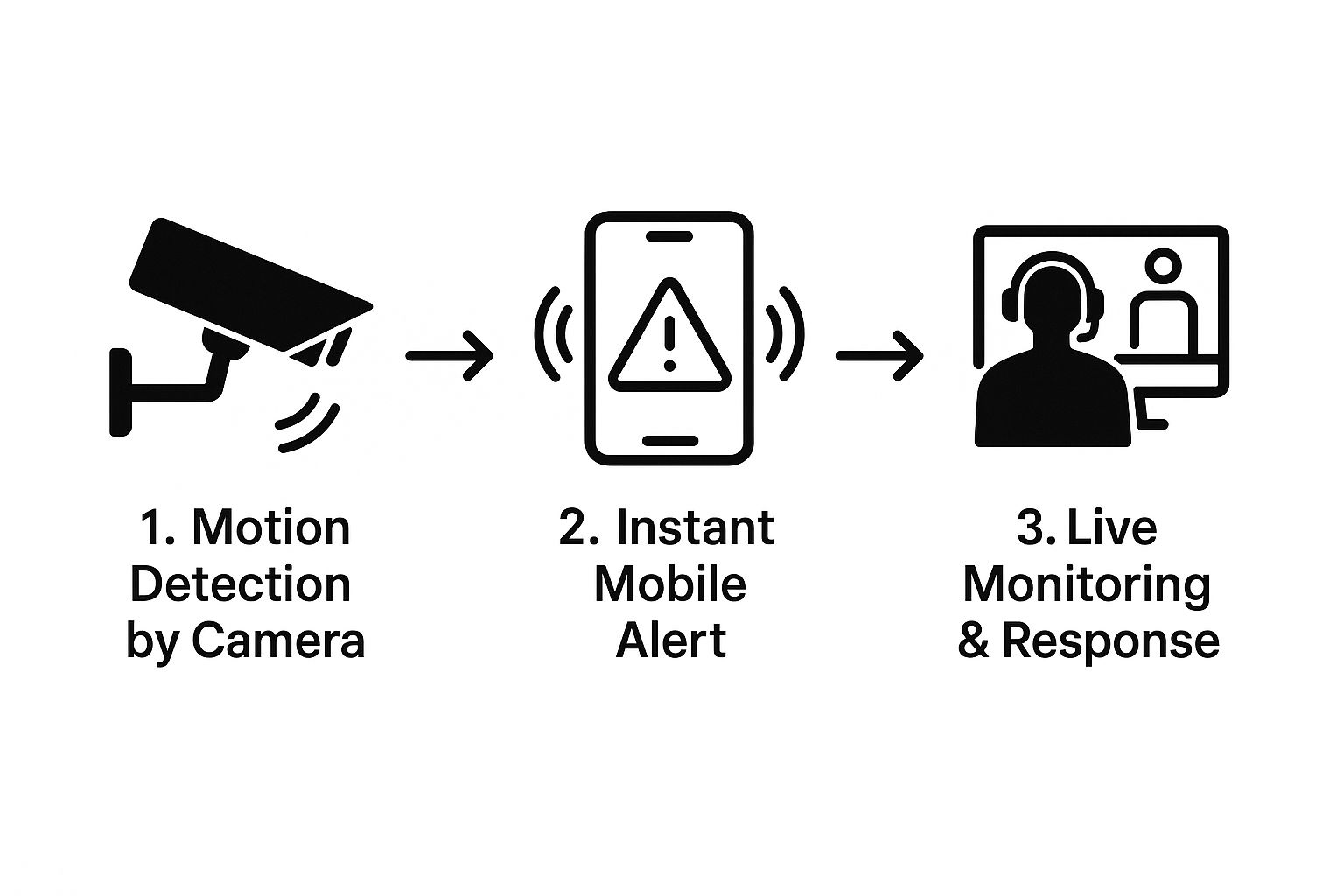
This simple process is the core benefit of a modern system: it transforms you from a passive observer into an active respondent. Something happens, you know instantly, and you can react in real-time, wherever you are.
Setting Up Remote Access and Alerts
One of the best parts of having a wireless system is being able to check on your business from your phone. Getting remote access going is usually pretty simple—just download the app, create an account, and scan a QR code on the camera or recorder.
But don't stop at just viewing the live feed. You need to be smart about your push notifications. If you turn everything on, you’ll quickly suffer from "alert fatigue," where you get so many dings and buzzes that you start to tune them out.
Instead, create a custom alert schedule. Maybe you only want motion alerts from inside the main office after 6 PM. For a server room or cash office, however, you might want instant alerts 24/7. Fine-tuning these settings ensures that when your phone goes off, you know it's something worth your attention. This is what separates a basic setup from a professional-grade security solution.
Your Wireless Security Questions Answered

As you start narrowing down your options, you'll inevitably run into some practical, real-world questions. I get it. I've heard them all from business owners just like you. Let's tackle the most common ones head-on to clear up any confusion and help you make a confident decision.
How Much Wi-Fi Bandwidth Do These Cameras Actually Use?
This is probably the most critical question I hear, because your new cameras can't be allowed to cripple the rest of your network. The answer really boils down to two things: video resolution and how often the camera is actively streaming.
A pretty standard 1080p camera will typically need about 1-2 Mbps of your upload speed while it's active. But if you jump up to a crystal-clear 4K camera, that number can easily climb to 5-8 Mbps or even higher. Now, multiply that by the number of cameras you're planning, and you can see how quickly it adds up.
Before you even think about buying, do yourself a favor: run an internet speed test at each spot where you want to place a camera. This gives you a real-world look at your Wi-Fi strength. If you’re planning a multi-camera 4K setup, you might need to have a conversation with your internet provider about upgrading your plan. The last thing you want is your security system slowing down your point-of-sale terminals during a lunch rush.
Will My Cameras Still Work if the Internet Goes Out?
Yes, but with some major caveats. The good news is that many modern wireless cameras are smart enough to keep recording to local storage—like a microSD card or a central Network Video Recorder (NVR)—even when the internet is down. This feature is absolutely vital to ensure you don't have a gap in your evidence.
The catch? You lose all your remote access. That means no checking the live feed from your phone, no new footage getting backed up to the cloud, and no motion alerts popping up on your screen until your connection is back online. For any business where real-time monitoring is a priority, a rock-solid internet connection is non-negotiable. If outages are a common occurrence where you are, a system with dependable local storage isn't just a feature; it's a must-have fail-safe.
A camera that records locally during an outage is your safety net. It guarantees that even if your connection drops, your security footage won't. This feature is a must-have for any serious business security setup.
What Are the Legal Rules for Using Security Cameras?
Navigating the legal side of things is crucial, and the rules can change quite a bit depending on your state or even your city. Broadly speaking, you're in the clear to record video in public-facing areas of your business where people don't have a reasonable expectation of privacy. Think about your sales floor, warehouse, lobby, and parking lots.
Where you'll get into trouble is recording in private spaces. This includes restrooms, changing rooms, and often employee break rooms.
Audio recording is a whole other ballgame and is much more restricted. Many states operate under "two-party consent," which means you legally need permission from everyone in a conversation to record their voices. Frankly, it's a legal minefield. That's why most businesses I work with simply disable audio recording altogether. Always post clear signage at every entrance letting folks know they are being monitored. Your best bet is always to consult a local legal expert to ensure you're 100% compliant.
How Do I Keep My Camera System Running Smoothly?
Getting top performance from your wireless security cameras for business comes down to simple, consistent maintenance. A few proactive checks can save you from massive headaches later on.
Here’s a quick checklist I give my clients for long-term reliability:
Install Firmware Updates Promptly: Manufacturers push out updates to fix security holes and improve how the cameras work. Don't ignore these—install them as soon as you get the notification.
Clean the Lenses: Every few months, take a soft microfiber cloth and gently wipe down the camera lenses. You'd be surprised how much dust, pollen, and grime can build up and make your footage look blurry.
Perform Regular System Checks: Once a month, just take five minutes to look at the live feed from each camera and skim through some recent recordings. It's a simple way to confirm everything is working and that the cameras are still pointing where you want them.
Verify Wi-Fi Connections: If you ever change your Wi-Fi password or get a new router, make it a point to go back and ensure every single camera has reconnected and is showing a strong signal.
Ready to build a security system that truly protects your business? The experts at PCI Audio-Video Security Solutions can help you design and install a tailored solution that meets your specific needs, from advanced 4K cameras to robust access control systems. Explore our commercial security solutions today!
Comments